Built for Players Who Demand More.

Escape From Tarkov Aimbot & ESP

Private loader access for main raids with player ESP, loot filters and tuned aim. Check the live status banner on eftcheatsstore.com before you queue.

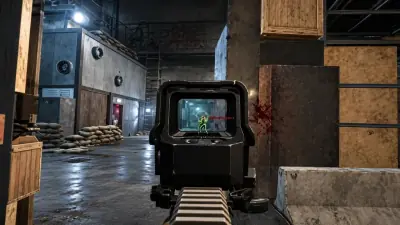
Escape From Tarkov first-person view through a holographic sight with a green skeleton highlight on an enemy in an indoor warehouse raid.

Yes

Stream-proof

<24h

Patch speed

300+

Users

24/7

Live support

ESP Active
Extract markers
Season Build
Aimbot Ready
Soft Aim Ready
No Recoil
Stream Proof
Loot ESP
Skeleton ESP
Transit hints
Extract ESP
24/7 Support
Instant Delivery
Raid Ready
Trigger Bot
Bone Select
Live Status
Auto Updates
Windows 10 & 11
Escape From Tarkov
BattlEye client
Auto updater
Config cloud sync
HWID reset
External loader
ESP Active
Extract markers
Season Build
Aimbot Ready
Soft Aim Ready
No Recoil
Stream Proof
Loot ESP
Skeleton ESP
Transit hints
Extract ESP
24/7 Support
Instant Delivery
Raid Ready
Trigger Bot
Bone Select
Live Status
Auto Updates
Windows 10 & 11
Escape From Tarkov
BattlEye client
Auto updater
Config cloud sync
HWID reset
External loader

Features

Everything you need in one package

Tarkov ESP, loot ESP, Tarkov Aimbot, no recoil and raid tools for Escape From Tarkov, maintained after patches.

Tarkov ESP

Track PMCs and Scavs.

Player boxes, skeleton outlines, name tags and distance readouts stay readable in factory halls, streets and resort wings.

  • PMC, Scav and boss filters
  • Skeleton and bone markers
  • Name tags and distance readouts
  • Health and gear hints where enabled
  • Color rules per faction

Loot ESP

Find value fast.

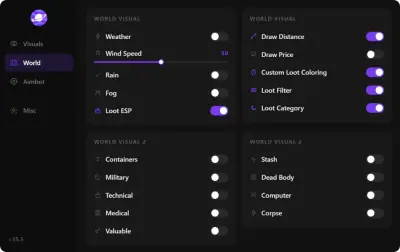
Highlight containers, corpses, keys and high-tier loot with price and category filters without opening every drawer.

  • Item category filters and price tiers
  • Container and corpse loot highlights
  • Quest and key item markers
  • Distance and name labels

Tarkov Aimbot

Controlled aim assist.

Soft aim, bone select and visibility gates with FOV and smoothing sliders tuned for raids, not rage defaults.

  • FOV and smoothing controls
  • Bone select and target priority
  • Visibility checks
  • Hotkey toggle per weapon class

No Recoil

Steadier full-auto.

Recoil compensation profiles per weapon family with portal presets for common builds.

  • Per-weapon recoil profiles
  • Strength sliders with caps
  • Pairs with aimbot FOV limits
  • Save profiles to cloud

Radar & Extracts

Map awareness in raid.

Extract markers, transit routes and a compact 2D overview for orientation between fights.

  • Extract and transition markers
  • Compact 2D overview with player blips
  • Custom zoom and opacity
  • Pairs with quest and loot ESP filters

Trigger Bot

Fire when aligned.

Optional trigger assist when crosshair meets valid targets, with delay and key gates.

  • Delay and hold-time tuning
  • Team and bot ignore rules
  • Toggle separate from aimbot
  • Conservative defaults in portal

Stream Proof

Built for creators.

Keep overlays on your monitor while capture software records a clean game feed.

  • OBS and Game Bar capture modes
  • Toggle stream proof per module
  • Test checklist in portal docs

Misc utilities

Raid QoL tools.

Night vision, thermal-style highlights, no sway and other toggles grouped in one utilities tab.

  • No sway and stamina helpers where enabled
  • Night vision and thermal-style modes
  • Crosshair and FOV helpers
  • Hotkey manager

Cloud Config & Updates

Patch day ready.

Same presets on every PC; portal updates track Escape From Tarkov and BattlEye patch days.

  • Cloud backup for slider profiles
  • Loader push within hours of patches
  • Status banner for build notes

Store

Our products

Every product has its own page with features, requirements and checkout.

Cloud DMA for Single-PC Setup

Designed to provision a Hyper-V layer on this PC and finish activation over an encrypted service link. No PCIe DMA card, USB bridge, or second tower.

Cloud DMA is the supported delivery stack on one Windows machine: virtualization, kernel-side features, and partner checkout without external DMA hardware.

  • Hyper-V provisioning
  • Single-PC stack
  • No PCIe DMA bridge

Skin Changer for Premium Weapon Skins

Designed to show premium weapon skins, outfits and knife variants in your client across supported titles. Cosmetics stay local and are not account items.

Low-footprint client that applies premium weapon skins, outfits and knife variants on major titles you run locally.

  • Premium weapon finishes
  • Character outfit swaps
  • Rare knife models

Why us

Raid tooling backed by patches, not promises

Many cheat shops ship stale loaders, obvious rage presets, and ticket bots. eftcheatsstore.com ships maintained Tarkov Cheats with patch-day loader builds, conservative ESP and aim defaults, and live operators.

  • Patch-day loader updates

    BattlEye-aware builds pushed within hours of Escape From Tarkov updates; check the live status banner before you load into a raid.

  • Humanized aim & ESP defaults

    FOV caps, smoothing and distance filters ship conservative in the portal so overlays stay readable, not wall-of-box rage modes.

  • Live operators

    Real engineers for loader setup, raid configs and HWID resets: 24/7 shift coverage, not copy-paste FAQ tickets.

  • External loader + stream proof

    Overlay suite with OBS capture modes, no risky DLL injection into the Escape From Tarkov process like legacy providers still sell.

  • Cloud preset sync

    PMC, Scav and per-map profiles backup to the portal, same sliders on any PC without rebuilding from scratch.

  • HWID reset & license moves

    HWID clears and machine transfers handled through support, most providers lock one rig or charge for every swap.

<24h

Patch turnaround

Typical window to post a loader build after major Escape From Tarkov or BattlEye changes, per status notes.

24/7

Operator support

Engineers on shift for setup, configs and account issues.

300+

Active operators

Windows raiders running Tarkov ESP, aim modules and raid utilities through eftcheatsstore.com.

Setup guide

From checkout to your first raid in just three simple steps

Follow the operator portal after checkout: download the external loader, import raid presets, and confirm status on Windows before you queue.

  1. Open portal and download loader

  2. Launch & configure modules

  3. Verify status & launch Escape From Tarkov

How it works

From status check to saved profile.

A straight path from status check to a raid profile you can reuse every session.

4 easy steps

  1. 01

    Tarkov Private Cheat

    Read the live banner on eftcheatsstore.com before you buy or launch a private raid build.

  2. 02

    Choose your product

    Pick raid cheats or the hardware utility, whichever matches bans, rigs, or account resets you face.

  3. 03

    Launch & configure

    Download from the portal, enable modules, and tune ESP and aim sliders offline first.

  4. 04

    Save your profile

    When settings feel right, save PMC and map presets to the cloud.

Blog

Guides and updates

ESP and aimbot setup, loot filters and patch-day checks for Escape From Tarkov.

Tarkov cheats get sold with a lot of promises attached. Here is what the feature list really means in a raid, what it changes about the way you play, and what it still will not fix.

Two options, one feature set. Here is the real difference between a monthly key and a lifetime key, and how to work out which one you will not regret.

Player ESP wins fights. Loot and extract intelligence wins wipes. Here is how to configure the money side of the cheat so it pays for itself instead of cluttering your screen.

FAQ

Questions about this page

Answers tied to what you are reading. Visit the FAQ page for every topic.